Tools: Claude • HTML • CSS • JavaScript • Interactive Hotspots • WCAG 2.2
Launch Interactive Module: https://counterfeit-chellem.netlify.app/ (opens new tab)
Project Overview
This project began as an experiment in rapid instructional development. My goal was to determine whether generative AI could produce a meaningful, interactive learning module—not just a polished web page—in a matter of hours.
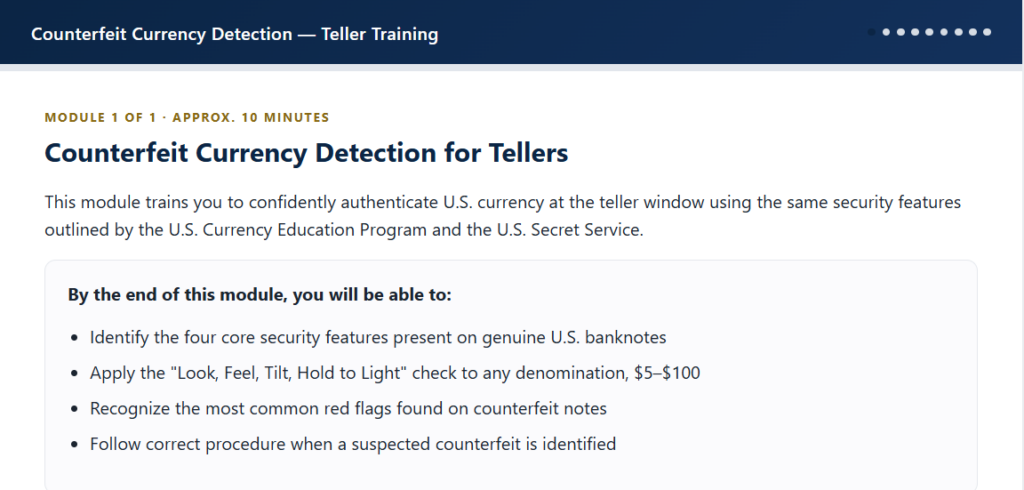
The result is a 10-minute microlearning module that prepares bank tellers to recognize the security features of modern U.S. currency before participating in hands-on practice with real bills. Rather than attempting to replace experiential training, the module builds the foundational knowledge learners need to inspect currency confidently and systematically.
The first working version was produced in approximately three hours through an AI-assisted development workflow. From there, my role shifted from content author to instructional designer, reviewer, and quality manager.
Learning Experience
The module combines several instructional strategies designed for rapid workplace learning:
- A short introduction explaining why counterfeit detection matters
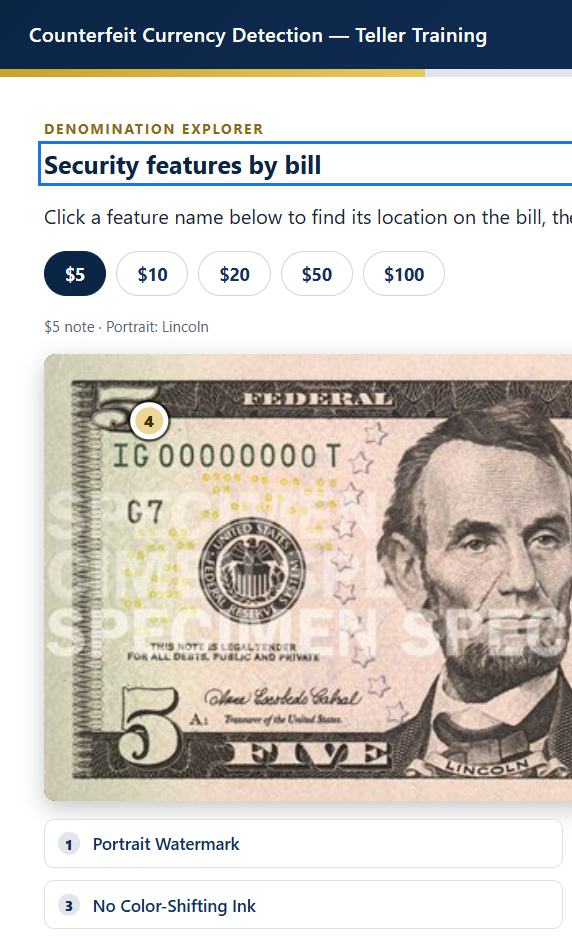
- Interactive exploration of security features across multiple denominations
- Hotspot activities that encourage active inspection rather than passive reading
- Knowledge checks with immediate feedback
- A workplace scenario that asks learners to apply what they have learned
- A concise summary and next-step guidance
The module intentionally stops where hands-on training begins. Learners finish prepared to examine real currency, but are not expected to become experts through eLearning alone.
My Role
Although AI generated much of the initial interface and code, the instructional design decisions remained mine.
Throughout development I:
- Defined the instructional scope and learning objectives.
- Refined the learner flow and sequencing.
- Added context explaining why the skill matters.
- Corrected interactions that appeared functional but did not support learning.
- Identified assessment items that exceeded the module’s scope and revised the instruction accordingly.
- Improved accessibility using WCAG 2.2 principles.
- Replaced generic interactions with hotspot-based exploration to better support visual recognition.
- Reviewed the experience from the perspective of learner performance rather than feature completeness.
Design Decisions
One of the more interesting design challenges involved the trade-off between authenticity and accessibility.
Early versions used simplified illustrations of U.S. currency, making hotspot placement visually clear. Later iterations incorporated official educational reference images to create a more realistic inspection experience. That decision introduced an accessibility challenge: hotspot controls that were clearly visible on simplified artwork no longer maintained sufficient contrast against the detailed currency images.
Rather than modifying the instructional media, I redesigned the interface layer so that hotspot controls, focus indicators, and keyboard navigation remained accessible while preserving the authenticity of the reference images. This became a useful reminder that instructional media and user interface elements often require different accessibility solutions.
Reflection
This project changed the way I think about AI-assisted instructional design.
Generative AI dramatically reduced development time, enabling a functional, interactive prototype to emerge in hours rather than days. What it did not replace was instructional judgment. The quality of the final experience depended on reviewing interactions, refining instructional flow, aligning assessments with objectives, improving accessibility, and ensuring that every interaction supported the intended learning outcome.
For well-defined learning problems like counterfeit currency recognition, AI proved to be an exceptionally effective development tool. The instructional designer’s role shifted from building every screen to directing the learning experience, evaluating design decisions, and refining the module until it met both instructional and usability expectations.